

Are you running property ads on Meta and they keep getting rejected? Or even worse, your entire ad account has been restricted?
You put the campaign together, upload the content and hit publish. Then you get a rejection notice, and it is not always clear what you have done wrong.
Before you change a few words and submit it again, find out what Meta has actually flagged.
Repeated policy violations can lead to wider advertising restrictions, and accounts can be permanently disabled. It is worth dealing with the underlying issue before submitting more adverts.
That does not mean Meta has banned estate agents from advertising. But property ads come with additional rules, and mortgage-related content can introduce another set of requirements.
Here is what to check.
Has your advert been rejected, or has your account been restricted?
These are different problems.
A rejected advert means Meta has decided that particular advert does not meet its requirements. An account restriction can affect your ability to advertise more broadly.
Start with the notification in your account.
| What you are seeing | Where to start |
|---|---|
| An individual advert has been rejected | Read the rejection reason and check the advert against the policy cited. |
| Your ad account or business has been restricted | Read the restriction notice and follow the steps provided for that account. |
| Housing targeting options are unavailable | Check the required campaign category. Missing targeting options do not, by themselves, mean your account is restricted. |
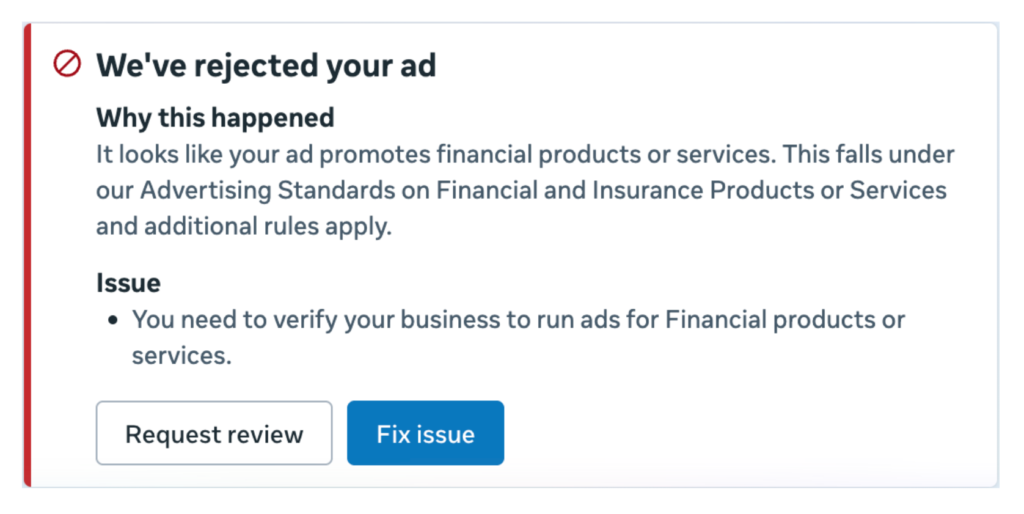
| The notice refers to financial products or services | Check whether the advert or destination promotes mortgages or another financial service. |
What should you do if Meta rejects your property ad?
1. Read the reason before changing anything
Open the rejected advert in Ads Manager and read the explanation.
Do not assume the problem is the property image or a particular word. Start with the policy Meta has identified.
Keep a screenshot of the notice so you have a record of what was flagged.
2. Check the whole advert, including the destination
Review the headline, main text, images and video. Include anything spoken in the video or written on screen.
Then check the page or form people reach after clicking.
For a property campaign, pay particular attention to:
- Whether the campaign uses the required housing classification
- Property details, prices and availability.
- Claims about incentives or investment returns.
- References to mortgages, repayments or financial services.
- Wording that could discriminate or imply knowledge of someone’s personal circumstances.
The problem may not be in the part of the advert you first notice.
Compare the content with the relevant section of Meta’s Advertising Standards.
3. Correct the actual issue
If the advert breaks a rule, address that issue before submitting it again.
That might mean correcting the campaign classification, removing an unsupported claim or getting financial promotion wording properly reviewed.
Making small changes without understanding the rejection can leave the same problem in place.
4. Request a review if you believe Meta has made a mistake
If you believe the advert complies, use the review option available in your account, where offered.
Keep the explanation specific. Refer to the policy cited and explain why you believe the advert meets it.
Follow the instructions in the rejection notice. The available options can vary, and a review does not guarantee approval.
Have you selected the correct housing category?
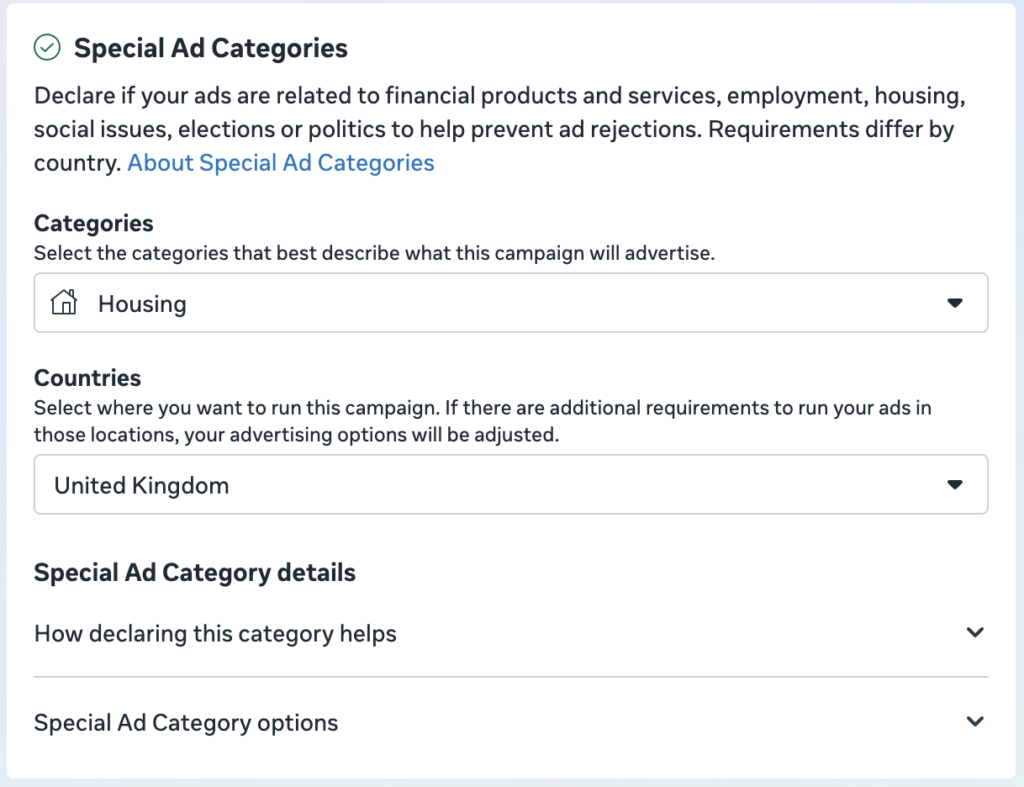
Property campaigns may need to be identified under Meta’s housing Special Ad Category.
Check the requirements for the campaign you are running and the country you are targeting. Where the housing classification is required, make sure it is selected.
This can change which targeting options are available.
It might be frustrating to lose settings you expected to use, but removing the category to get those options back is not the answer.
The campaign needs to be classified correctly.
You can check Meta’s guidance on Special Ad Categories alongside the settings available in your account.
Mentioning mortgages? There is another set of rules to consider
This is something we have had to look at when running ads for a client whose content discussed mortgages.
An estate agent might see mortgage information as part of the conversation about buying a home. But an advert promoting a mortgage product or service can fall within financial promotion rules.
In the UK, a regulated financial promotion generally needs to be communicated by an authorised person, approved by an authorised person who is legally able to approve it, or covered by an applicable exemption.
So the rule is more specific than “you cannot mention mortgages unless you are FCA approved”.
The content and context matter.
If your advert includes mortgage offers, repayment examples or an invitation to use a mortgage service, get the wording and destination checked by the responsible compliance adviser or appropriately authorised firm before publishing.
Check any applicable Meta requirements separately. Selecting the housing category does not automatically resolve a financial-services issue.
And Meta approving an advert does not establish that it complies with UK financial promotion rules.
The FCA explains this in its guidance on approving financial promotions.
Can repeated rejections get your ad account permanently restricted?
Repeated policy violations can lead to restrictions beyond the individual advert. In some circumstances, an ad account can be permanently disabled.
That is why you should take recurring rejections seriously.
It does not mean every rejected advert leads to an account restriction. Nor should you assume that you can safely collect a certain number of rejections before taking action.
If the same issue keeps appearing, stop submitting variations and investigate the reason.
Correct the underlying problem, or request a review if you believe the decision is wrong.
What should you do if your entire ad account is restricted?
Start by identifying exactly what has been restricted.
The notice may relate to your ad account, business portfolio, Facebook Page or your personal access to advertising. Those are not interchangeable.
Read the restriction notice
Check the reason and the actions Meta is asking you to take.
Do not assume every restriction comes from a rejected advert. Account security, verification or unusual payment activity can also require attention.
Complete the requested checks
Follow the instructions shown through Meta’s official account tools.
Depending on the issue, you may need to confirm your identity, verify business information, secure the account or resolve a payment problem.
Only submit information through Meta’s official channels.
Request a review where available
If you believe the restriction is incorrect, use the review process offered for the affected account or asset.
Explain the situation clearly and provide the information requested.
If you have corrected a problem, describe what you changed. If you believe the restriction is a mistake, explain why.
Reinstatement is not guaranteed, and some restrictions can be permanent.
Do not create another account to get around it
A replacement account does not resolve the original issue.
Deal with the restriction through the process Meta provides rather than trying to continue the same activity elsewhere.
What should estate agents check before publishing?
Before submitting your next property advert, check that:
- The campaign uses the required advertising category.
- Property information and claims are accurate.
- The advert and destination comply with the relevant policies.
- Mortgage or financial-services content has had the appropriate compliance review.
- Any issue behind a previous rejection has been addressed.
- Outstanding account checks or restrictions have been dealt with.
If you have already had several rejections, start with the reasons Meta has given you. Those should guide your next steps.
Need help with your property ads?
Crimson Social manages Meta advertising for estate agents and property developers.
If your property ads keep getting rejected, we can help review the campaign setup, content and destination against the issues Meta has flagged.
Find out more about our Meta advertising services for estate agents.